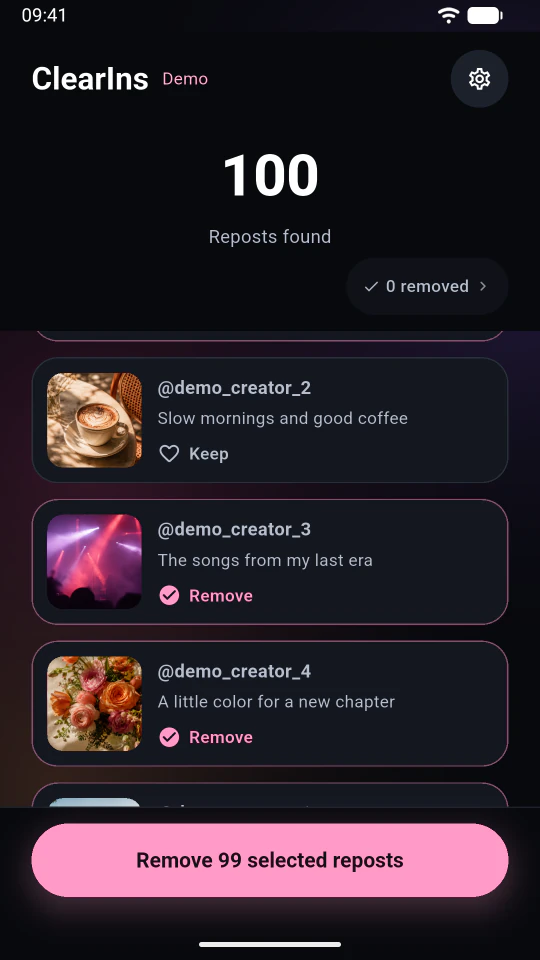
Instagram lets you delete multiple reposts, but you still need to check each one individually. ClearIns makes a large cleanup more convenient with an automated removal workflow, saving you repetitive selection and taps.
Without ClearIns
Select each repost manually — one by one
Tap the repost icon to remove it
Wait for Instagram to process
Repeat 500+ times for a full cleanup
~80 minutes for 500 reposts
Risk of accidentally liking or sharing
With ClearIns
Install the free Chrome extension once
Open Instagram Web and click Start
ClearIns removes ALL reposts automatically
Real-time progress — watch it happen live
~25 minutes for 500 reposts
No password, no sign-up, no server access
4.8 out of 5 from 155 ratings on the Chrome Web Store, November 2026.
ClearIns is a free Chrome extension that integrates directly with Instagram Web. No app install, no account creation — just add it to Chrome and start removing reposts in seconds.
01
Open Chrome Web Store
Search for ClearIns or click the button below to go directly to the extension page.
02
Click "Add to Chrome"
Hit the blue Add to Chrome button. No account or payment required.
03
Open Instagram Web
Go to instagram.com in Chrome. You'll see the ClearIns icon in your toolbar.
04
Remove All Reposts
Click the ClearIns icon and press Start. Every repost is removed automatically.
Instagram lets you delete multiple reposts, but you still have to select each one. Here's why creators use ClearIns.
Accidental Reposts
The repost button sits millimeters from 'Like', leading to unwanted shares that clutter your profile.
Brand Consistency
Off-niche reposts dilute your aesthetic and confuse your followers about what your account stands for.
Privacy & Footprint
Remove dated or controversial content fast. Clean your digital footprint without the manual grind.
Less Manual Selection
Instagram requires you to select reposts one by one for bulk deletion. ClearIns makes large cleanups easier with an automated removal workflow.
How to Remove Instagram Reposts in 3 Steps
The fastest Instagram repost remover. Install once, clean forever.
01
Install ClearIns
Add the free ClearIns Chrome extension from the Chrome Web Store. No sign-up, no account needed.
02
Open Instagram Web
Navigate to instagram.com in Chrome and sign in to your Instagram account as normal.
03
Start Removing Reposts
Click the ClearIns icon and press 'Start Removing Reposts'. Watch your profile get cleaned in real time.
Works in Your Browser, No Server Access Needed
Runs entirely in your Chrome session
No Instagram password ever requested
No data sent to external servers
Built-in rate limiting protects your account
Pause or stop at any time
Everything You Need in an Instagram Repost Remover
Bulk Removal
Delete hundreds of Instagram reposts in minutes, not hours.
No Password Required
Runs in your own browser session. We never touch your credentials.
Real-time Progress
Watch every repost get removed live with a detailed progress tracker.
Smart Rate Limiting
Built-in pacing mimics natural behavior to keep your account safe.
Background Operation
Switch tabs and multitask while ClearIns works in the background.
Export Deleted URLs
Download a complete log of all removed reposts for your records.
100% Local & Private
All actions stay in your browser. Zero data sent to external servers.
Fast Bulk Cleanup
Remove 100 reposts in ~5 minutes or 500 reposts in ~25 minutes.
Keep what feels like you. · Concept illustration
Bulk Remove Instagram Reposts 100 Reposts in ~5 Minutes
Instagram supports bulk deletion, but you still need to check each repost individually. ClearIns automates removal so a large cleanup needs less repetitive input. At an estimated 3 seconds per repost, 500 reposts take about 25 minutes; actual time varies.
The safest and fastest way to remove Instagram reposts.
Method
Time (500 reposts)
Account Risk
Cost
Instagram native bulk delete
Varies; select each repost
None
Free
Random Cleaner App
Unknown
High
Varies
Apps Requiring Password
Unknown
Very High
Paid
ClearIns (Recommended)Recommended
~25 min
Low
Free
How Long Will It Take?
Illustrative estimate: 3 seconds per repost with ClearIns versus 10 seconds when removing each post separately. Instagram's native multi-select workflow can be faster; actual times vary.
With ClearIns
13m
~3 sec / repost
Individual Deletion
42m
~10 sec / repost
Save 29 minutes — 69% faster with ClearIns
A little less clutter. A little more you. · Concept illustration
Ready to Clean Your Instagram Profile?
Download ClearIns for Android, iPhone and iPad, or choose the browser extension for Chrome and Edge.
Free extension No sign-up No password needed Android and iOS apps available
Frequently Asked Questions
Everything you need to know about the ClearIns Instagram repost remover.
What is an Instagram all repost remover?
An Instagram all repost remover is a tool that removes every repost from your Instagram Reposts tab in bulk. ClearIns does this from Instagram Web with a free Chrome extension, so you do not have to delete reposts one by one.
Can I bulk delete reposts on Instagram?
Instagram supports deleting multiple reposts in Your activity, but you still have to select each one individually. ClearIns makes large cleanups more convenient by automating the removal workflow, so you spend less time on repetitive selection and taps.
Is there an Instagram repost remover extension?
Yes. ClearIns is an Instagram repost remover extension for Chrome and Microsoft Edge. Install it, open instagram.com in the same browser, and start removing reposts from your existing Instagram Web session.
Can ClearIns remove reposted videos and Reels?
Yes. ClearIns removes reposted posts, videos, and Reels that appear in your Instagram Reposts tab. It only removes your repost of the content and never deletes the original creator's post or any of your own original posts.
Is ClearIns an Instagram repost deleter or cleaner?
Both. People call this workflow an Instagram repost remover, repost deleter, or repost cleaner. ClearIns focuses on the same outcome: bulk deleting unwanted reposts so your Instagram profile looks clean again.
What is an Instagram repost remover?
An Instagram repost remover is a tool that lets you bulk delete all the posts you have reposted on Instagram. ClearIns automates this process so you can remove hundreds of reposts in minutes instead of manually deleting them one by one.
How do I remove a repost on Instagram?
To remove a repost on Instagram manually, go to your profile, tap the Reposts tab, select each repost, and tap the repost icon to remove it. For bulk removal, use ClearIns — install the free Chrome extension, open Instagram Web, and click 'Start Removing Reposts' to delete all reposts automatically.
Is ClearIns safe to use?
Yes. ClearIns runs entirely in your own browser session and never asks for your Instagram password. It automates the same on-screen actions you would do manually, with built-in rate limiting to protect your account.
How long does it take to remove all Instagram reposts?
ClearIns removes about one repost every 3 seconds. That is roughly 100 reposts in ~5 minutes and 500 reposts in ~25 minutes, compared with about 10 seconds per repost manually.
Does Instagram notify people when I remove a repost?
No. Instagram does not send notifications to the original creator when you remove your repost of their content.
Can I remove all Instagram reposts at once?
Yes. ClearIns lets you bulk remove all your Instagram reposts at once with a single click. The extension automatically identifies all your reposts and removes them in sequence.
Does ClearIns work on mobile?
Yes. ClearIns is available for Android on Google Play and for iPhone and iPad on the App Store. On desktop, use the ClearIns extension with Google Chrome or Microsoft Edge.
Is ClearIns free?
Yes, ClearIns is free to use. The Chrome extension is available at no cost from the Chrome Web Store.
Will ClearIns delete my original posts?
No. ClearIns only removes content you have reposted from other accounts. Your original posts, stories, and reels remain completely untouched.
What browsers does ClearIns support?
ClearIns currently supports Google Chrome and Microsoft Edge on desktop. Firefox and Safari support is planned for future releases.